
How To Adjust Your Chair To Stop Back Pain At Work
Lower back pain can affect your comfort and your focus at work, and learning how to adjust your chair can make a real difference. Many people sit for long hours without realising that small changes can ease pressure on the spine. You can explore a DSE Assessment on our website if you want personalised guidance. A well adjusted chair supports your natural posture and helps your body stay relaxed through the day. Your workstation plays a major role in how your back feels, and simple adjustments can improve your comfort. This guide explains how to adjust your chair in a clear and practical way so you can work with ease.
Learning how to adjust your chair can reduce lower back pain by supporting your natural posture and keeping your spine in a neutral position. The correct setup places your feet flat on the floor, your hips slightly above your knees, and your back fully supported by the chair. These adjustments help your body stay comfortable during long periods of work.
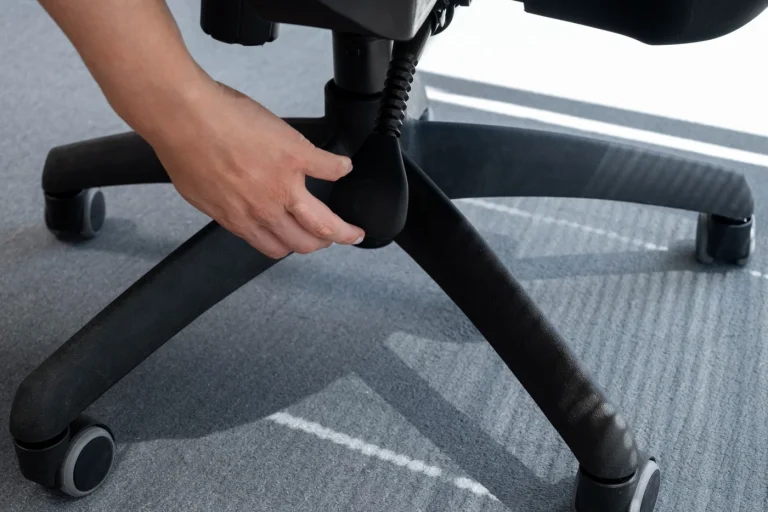
Seat Height and Foot Placement
Understanding how to adjust your chair begins with the height of the seat. Your feet need to rest flat on the floor with your knees at a comfortable angle. This position keeps your lower back steady and prevents your hips from tilting forward or backward. A stable base gives your spine the support it needs throughout the day.
A seat that is too high can cause your legs to dangle and your lower back to tighten. A seat that is too low can push your knees upward and place pressure on your hips. You can find the right height by sitting down and checking that your thighs feel level and your feet feel grounded.
Your chair should allow you to sit close to your desk without leaning forward. This helps your back stay supported and prevents strain on your shoulders. A comfortable distance from your desk keeps your posture steady and your movements relaxed.
Your comfort improves when your body feels balanced and supported. VergoUK offers guidance with workstation adjustments as advised by the HSE and you can contact us if you want help with your chair setup.

Back Rest and Lumbar Support
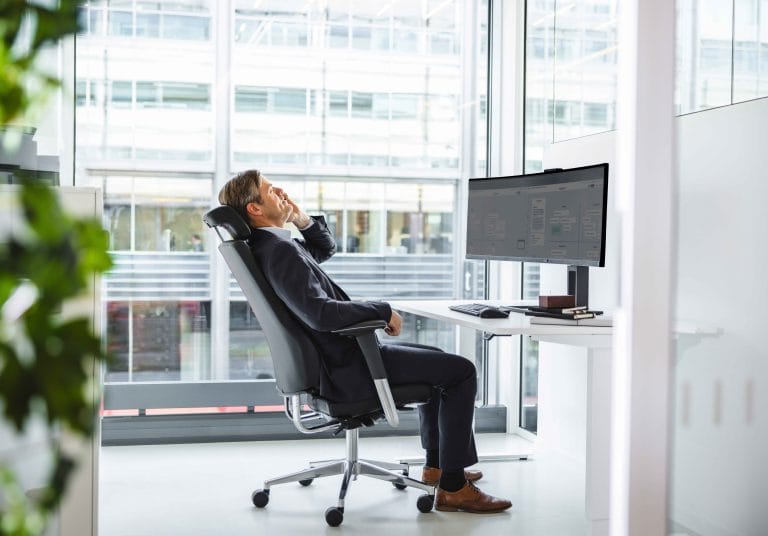
The backrest plays a major role in how to adjust your chair for lower back comfort. Your lower spine has a natural curve and your chair needs to follow that shape. A backrest that supports this curve helps your muscles relax and reduces pressure on your lower back.
You can sit back fully and allow the backrest to hold your weight. This position keeps your spine aligned and prevents slouching. A firm but comfortable backrest gives your body the support it needs during long periods of sitting.
Your lumbar area benefits from gentle support that fills the space between your lower back and the chair. This support keeps your posture steady and prevents your spine from rounding. You can adjust the backrest height until the curve matches your lower back.
A supported posture helps you stay comfortable and focused. VergoUK provides this type of workstation support and you can get in touch if you want your setup checked by a specialist.

Key Chair Adjustments to Reduce Lower Back Pain at Work
Seat Height
Set your chair height so your thighs sit comfortably horizontal, your feet rest flat on the floor, and your hips stay slightly higher than your knees. This creates a 90-110° hip angle, which reduces pressure on the lower back. If your feet don’t reach the floor, use a stable footrest to maintain proper support.
Lumbar Support
Adjust the backrest so the lumbar curve fits naturally into the lower part of your spine. This prevents slouching and keeps your pelvis in a neutral position. If your chair doesn’t offer built‑in lumbar adjustment, add a lumbar roll or a rolled towel to support the natural curve of your lower back.
Seat Depth
Sit fully back in the chair so your spine is supported. You should have a 2–3 finger gap between the front edge of the seat and the back of your knees. This improves circulation and prevents you from sliding forward into a rounded posture.
Backrest Angle
Recline the backrest slightly to a 100–110° angle. This reduces load on the spinal discs and encourages a more relaxed, supported posture compared to sitting bolt upright at 90°.
Armrests
Position armrests so your shoulders stay relaxed and your elbows rest at roughly 90°. Armrests should support your arms without lifting your shoulders or stopping you from sitting close to your desk. If they get in the way, lower them or move them outwards.
Seat Depth and Sitting Position
Seat depth affects how to adjust your chair in a way that protects your lower back. You need enough space to sit back fully while keeping a small gap between the edge of the seat and the back of your knees. This gap helps your circulation and prevents pressure on your legs.
A seat that is too deep can push you forward and remove support from your lower back. A seat that is too shallow can limit your movement and reduce comfort. You can adjust the seat depth until your back feels supported and your legs feel relaxed.
Your sitting position should allow your hips to stay slightly higher than your knees. This position keeps your pelvis steady and reduces strain on your lower back. A balanced sitting posture helps your body stay comfortable through the day.
A well adjusted seat improves your comfort and your posture. This is the kind of support we offer at VergoUK and you can reach out if you need help setting up your workstation correctly.
Learning How to Adjust Your Chair and Why It Matters
Lower back pain can affect your wellbeing and your confidence at work. A well adjusted chair supports your posture and helps your body stay relaxed. Small changes can improve your comfort and prevent long term strain. Your workstation plays a major role in how you feel each day.
When You Should Get a DSE Assessment
You may need a DSE assessment when you experience ongoing discomfort, when you start a new role, or when your equipment changes. You may also need one when you begin working from home or when you return to work after time away. Employers have a responsibility to support safe working practices and a DSE Assessment can help you understand what needs to change. You can request an assessment when your workstation no longer feels comfortable or when you want expert guidance.
Need a DSE Workstation Assessment?
You can fill in our DSE assessment contact form below if you want personalised help with your workstation so you can work in comfort and ease.
How often should I adjust my chair at work?
What is the best way to support my lower back while sitting?
Why does my lower back hurt when I sit at my desk?
Can a chair adjustment really stop lower back pain?
Do I need a new chair if my back hurts at work?